Watercolor Butterfly Clipart: A Practical Guide to High-Quality Digital Assets
In the world of digital design and handmade crafts, the difference between a professional-looking product and an amateur one often comes down to the quality of your assets. Watercolor butterfly clipart has become a staple for creators ranging from planner enthusiasts to small business owners selling custom apparel. The soft, organic textures of hand-painted elements bring a warmth that flat vector graphics simply cannot replicate. However, not all digital downloads are created equal. Many creators rush into purchasing or using low-resolution files, only to find their final prints look pixelated or muddy. Understanding what to look for in these digital packs can save you time, money, and frustration.
The Resolution Trap: Why DPI Matters More Than You Think
One of the most common mistakes beginners make is ignoring the technical specifications of their clipart. You might find a beautiful green butterfly illustration online, download it, and place it into your design software. On your screen, it looks crisp and vibrant. But when you print it on a sticker sheet or transfer it to a tote bag, the edges appear jagged and blurry. This happens because the file lacks sufficient resolution.
For high-quality printing, you need files that are at least 300 DPI (dots per inch). A standard web image is usually 72 DPI, which is fine for blogs but disastrous for physical products. When evaluating a watercolor green butterfly clipart set, always check the pixel dimensions. A file size of approximately 3000 x 3000 pixels at 10x10 inches ensures that you can scale the image up or down without losing clarity. If a seller does not explicitly state the DPI or pixel dimensions, it is a red flag. Always prioritize instant download packs that guarantee high-resolution RGB PNG files.
Background Transparency and Usability
Another critical aspect often overlooked is the file format. JPEGs are common, but they come with a white background baked into the image. This makes them nearly impossible to layer over colored paper, patterned planner dividers, or dark-colored t-shirts without obvious white boxes surrounding the butterfly. To avoid this extra editing work, ensure you are downloading PNG files with transparent backgrounds.
Transparent PNGs allow you to drop the element directly into your project, whether you are making party invitations or scrapbooking layouts. This feature is essential for efficiency. Imagine trying to manually erase the background of a delicate watercolor wing using complex masking tools in photo editing software. It is time-consuming and rarely looks natural. By choosing a pack that already provides separate, transparent images, you streamline your workflow significantly. This is particularly important for entrepreneurs who need to produce inventory quickly, such as custom totes or tee shirts using sublimation transfers.
Color Accuracy and Sublimation Challenges
If you plan to use these illustrations for sublimation printing, color management becomes vital. Watercolor art relies on subtle gradients and translucent layers. When printed on fabric or ceramic, colors can shift depending on the printer profile and the base material. A vibrant green butterfly might turn out dull if the original file was not calibrated correctly or if it was saved in the wrong color mode.
Most digital clipart is provided in RGB color mode, which is ideal for screens and many modern printing processes. However, if you are sending files to a professional offset printer for large-scale stationery runs, they may require CMYK. For most DIY projects, including planner stickers and blog graphics, RGB is perfectly suitable. The key is to test print a small batch first. Check how the watercolor textures translate to your specific medium. Does the green look lush and natural, or does it appear neon and artificial? Adjusting brightness and contrast slightly before printing can often bridge the gap between screen and surface.
Versatility Beyond the Obvious
Many users limit their thinking to standard applications like greeting cards. While watercolor butterfly clipart is indeed perfect for card making and announcements, its utility extends much further. Consider the growing market for digital planning. These high-quality elements can be used to create hyperlinked tabs, decorative headers, or functional divider pages in digital planners sold on platforms like Etsy.
- Planner Accessories: Use the clips to design printable planner stickers or physical die-cut stickers.
- Brand Identity: Incorporate subtle botanical elements into logos or photo overlays for lifestyle bloggers.
- Home Decor: Apply transfers to cushion covers, wall art, or glassware using decoupage techniques.
- Educational Materials: Teachers can use these engaging visuals for classroom decorations or reward charts.
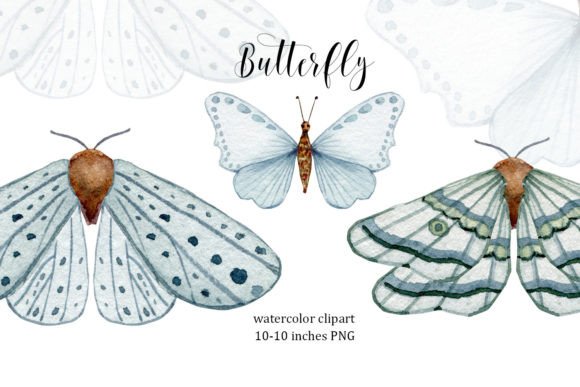
The versatility of a well-made pack means you get more value for your money. Instead of buying separate assets for every project, a cohesive set of three high-quality elements can serve multiple purposes across different product lines.
Avoiding Licensing Pitfalls
Before you integrate any clipart into a product you intend to sell, read the license agreement. Some free resources allow personal use only, meaning you cannot use them on items for sale. Others may require attribution. Reputable sellers of premium clipart usually offer commercial licenses that allow you to use the designs in end products like printed shirts or invitations. However, they typically prohibit reselling the digital file itself. Understanding these boundaries protects your business from legal issues and respects the artist’s work.
Making the Right Choice for Your Project
When selecting your next set of illustrations, look beyond the thumbnail. Check for consistency in style. If you are buying a set of succulent illustrations or butterflies, ensure the painting style matches across all files. Mismatched styles can make a design look disjointed. Additionally, consider the composition. Are the butterflies posed in ways that are easy to crop? Do they have enough negative space around them for easy selection?
Investing in a high-quality pack, such as one containing hand-painted elements at 300 DPI, pays off in the long run. It reduces the need for extensive editing, ensures professional print results, and enhances the aesthetic appeal of your creations. Whether you are a hobbyist making birthday cards or a freelancer designing brand assets, taking the time to evaluate the technical and artistic quality of your clipart will elevate your final output. Choose wisely, test thoroughly, and let the natural beauty of watercolor enhance your creative projects.