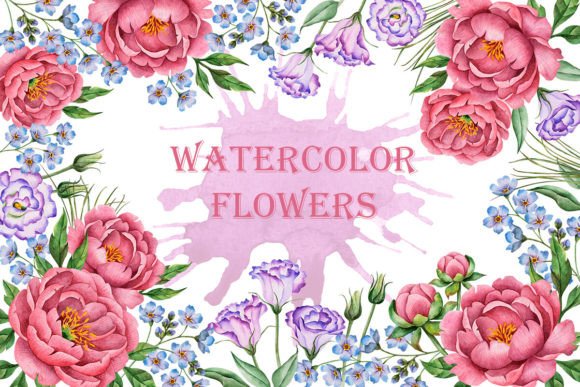
Watercolor Peony and Eustoma: A Guide to High-Quality Floral Design Assets
Integrating organic, hand-drawn elements into digital projects requires more than just finding pretty pictures; it demands assets that are technically sound and aesthetically versatile. The Watercolor Peony and Eustoma collection represents a curated set of botanical illustrations designed to bridge the gap between traditional artistry and modern digital utility. For designers, entrepreneurs, and hobbyists alike, understanding the nuances of these assets can significantly elevate the quality of greeting cards, wedding invitations, textile prints, and web designs.
This specific set includes thirty distinct graphic elements, comprising nineteen individual floral components, five pre-arranged bouquets, and six wreaths. Each piece features peonies, eustoma, eucalyptus, and forget-me-nots, rendered in a soft, authentic watercolor style. However, many users overlook critical technical details when selecting such resources, leading to frustration during the production phase. By addressing common pitfalls early, you can ensure a smoother creative workflow and a more professional final product.
Understanding Resolution and Print Quality
One of the most frequent mistakes beginners make is ignoring the resolution specifications of digital clipart. Many free or low-quality resources offer images at 72 DPI (dots per inch), which is suitable for screen display but disastrous for printing. If you attempt to print a 72 DPI image on a wedding invitation or a textile product, the result will appear pixelated, blurry, and unprofessional.
The Watercolor Peony and Eustoma illustrations are saved in high resolution at 300 DPI. This is the industry standard for high-quality printing. Before purchasing or downloading any floral asset, always verify this specification. Using 300 DPI files ensures that the delicate textures of the watercolor petals and the subtle gradients of the eucalyptus leaves remain crisp and clear, even when scaled up for larger formats like posters or fabric rolls. Ignoring this detail can lead to costly reprints and dissatisfied clients.
The Importance of Transparent Backgrounds
Another common oversight involves file formats. Some users download JPEG images, which have solid white backgrounds, and then struggle to remove the background using editing software. This process is time-consuming and often results in jagged edges or lost detail, particularly with complex shapes like flower petals.
All images in this set are provided in PNG format with transparent backgrounds. This feature is crucial for efficiency and design flexibility. A transparent background allows you to layer the peonies, eustoma, and forget-me-nots directly onto colored paper textures, patterned fabrics, or website headers without any manual editing. For web designers and bloggers, this means faster load times and cleaner integration into themes. Always prioritize PNG files for graphic elements intended for layering, as they preserve the integrity of the original hand-drawn illustration.
Maximizing Versatility Through Individual Elements
A significant misunderstanding among novice designers is the belief that pre-made bouquets are sufficient for all design needs. While the five included PNG bouquets are beautiful and ready-to-use, relying solely on them limits your creative potential. Pre-arranged compositions may not fit specific layout constraints or color schemes.
The true value of this collection lies in the nineteen individual floral elements. By having separate files for peonies, eustoma blooms, eucalyptus branches, and forget-me-nots, you gain the freedom to construct custom arrangements. This approach allows for greater control over spacing, balance, and visual flow. For instance, you might need a single eustoma stem to accent a minimalist business card, or a cluster of forget-me-nots to frame a quote on a blog post. Building your own compositions from individual parts ensures that the design feels bespoke rather than generic.
Legal Usage and Commercial Applications
Many creators fail to read licensing agreements thoroughly, leading to accidental copyright infringement. It is essential to understand where and how you can use these graphics. The Watercolor Peony and Eustoma set is designed for broad application, including textile printing, web design, and physical products like greeting cards.
However, always check if the license permits resale of the digital files themselves. Typically, you are allowed to use the images in end products that you sell, such as printed invitations or branded merchandise, but you cannot redistribute the raw PNG files as a standalone clipart pack. Clarifying these boundaries protects your business and respects the artist’s work. For small business owners and freelancers, maintaining clear records of asset licenses is a best practice that prevents legal complications down the line.
Color Management and Consistency
Watercolor illustrations rely heavily on subtle color variations. A common issue arises when colors appear different on screen versus in print due to improper color management. Digital screens use RGB (Red, Green, Blue) color models, while printers use CMYK (Cyan, Magenta, Yellow, Key/Black).
To avoid disappointment, preview your designs in CMYK mode if possible before sending them to print. The soft pastels of the peonies and the muted greens of the eucalyptus may shift slightly during conversion. Testing a small proof print can help you adjust brightness and contrast to ensure the final output matches your vision. This step is particularly important for wedding stationery, where color consistency across multiple items is expected.
Organizing Your Digital Assets
Efficiency in design is not just about the quality of the images but also about how quickly you can access them. With thirty individual files, disorganization can slow down your workflow. Create a dedicated folder structure on your computer or cloud storage. Separate the individual elements from the bouquets and wreaths. Naming files descriptively, such as "Peony_Pink_Left.png" or "Eucalyptus_Sprig_01.png," saves valuable time during the design process.
For educators and content creators who use these assets frequently, having a well-organized library allows for rapid prototyping of blog themes, social media graphics, and educational materials. This habit reduces stress and increases productivity, allowing you to focus on creativity rather than file hunting.
Final Considerations for Selection
When evaluating floral clipart, look beyond the initial aesthetic appeal. Consider the technical specifications, the versatility of the elements, and the clarity of the licensing terms. The Watercolor Peony and Eustoma collection offers a balanced mix of ready-to-use compositions and customizable parts, all delivered in high-resolution PNG format. By avoiding common mistakes related to resolution, file types, and usage rights, you can leverage these hand-drawn illustrations to create stunning, professional-grade designs. Whether you are crafting a heartfelt greeting card or branding a new business, these tools provide the foundation for elegant and effective visual communication.